MusicTune-Offline Music Player
3.914.00Reviews
Analysis ByAppCompare
I tried MusicTune-Offline Music Player as a straightforward way to keep locally stored music organized and playing without depending on a connection. That focus immediately sets it apart from streaming services: instead of searching a huge online catalog, I worked with the audio already available on the device. For the right listener, that makes the app feel practical rather than overloaded.
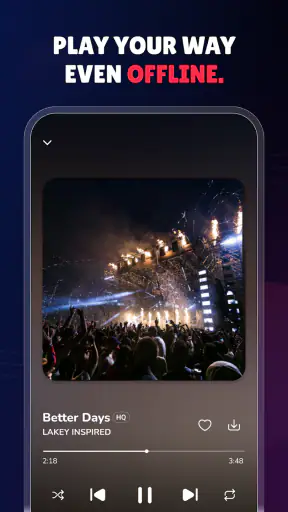
MusicTune is a free tools app from Storm Libs Limited, and its main appeal is easy to understand. It is designed for offline playback, lossless audio, playlists, and listening in the background. I found that combination most useful when I wanted my music to stay available during travel, in places with unreliable reception, or while using another app. It is not trying to replace a streaming subscription; it is aimed at people who already own or manage their music files.
The app has an Everyone content rating, works from Android 7.0 onward, and has reached over a million installs. Its current version is 1.5.6, while the store listing shows a 3.9 average from around 3.2 thousand ratings. Those numbers suggest a reasonably established utility, although they also make me approach it as a practical player that may suit some listening habits much better than others.
How MusicTune feels during everyday playback
Quick access matters more than flashy extras
The first thing I noticed is that an offline player lives or dies by how quickly I can get from opening it to hearing the right track. MusicTune makes sense when I want a personal collection rather than recommendations, social features, or a constantly changing home screen. Once the music is available locally, the workflow is naturally more direct: choose a track or playlist, start playback, and leave the app running in the background.
That simplicity is also the reason I would not recommend it to everyone. If your collection is mostly inside a streaming service, MusicTune does not automatically solve the problem of finding those songs elsewhere. Its value appears when you have music files you can use on the device and want a dedicated player for them. In that situation, avoiding an online catalog can make the experience feel calmer and more predictable.
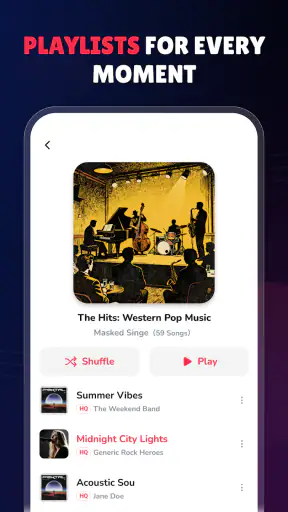
The support for playlists is especially important for daily use. I can imagine keeping separate groups for commuting, exercise, quiet evenings, or albums that I want to hear in sequence. A playlist is more useful than repeatedly browsing a general music folder, but it does require some organization from the listener. MusicTune is best when I take a little time to arrange the collection instead of expecting the app to create a perfect library automatically.
What happens when the phone is doing more
Music playback is normally a light task, but the experience changes when the phone is also handling navigation, messaging, downloads, photography, or a demanding game. In those moments, the important question is not just whether a song starts. I also want background playback to remain convenient while I move between apps, and I want the player to recover sensibly if the operating system interrupts it.
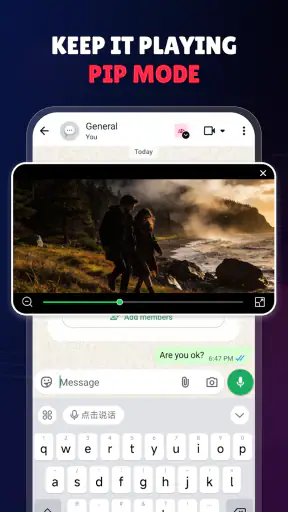
MusicTune’s background playback is a meaningful strength for this kind of use. I can treat the phone as a music source rather than keeping the player visible all the time. That is useful when I am following directions, reading, or replying to messages. It also means the app belongs in the same practical category as a small utility: it should stay out of the way once playback has begun.
There is a trade-off here. Any background audio player competes for battery and system attention, even when the music itself is not demanding. I would avoid leaving several unnecessary apps active at the same time if I were trying to preserve battery during a long day. MusicTune is more sensible for controlled, offline listening than for treating the phone as an always-on music server.
Lossless audio is useful only when the source deserves it
The lossless-audio support sounds attractive, but I would keep expectations realistic. It cannot improve a recording that was already compressed or poorly sourced. Its benefit is clearest when the original file is genuinely lossless and the rest of the listening chain is good enough for the difference to matter.
That makes MusicTune a better match for listeners who deliberately maintain higher-quality files. If I am using ordinary low-quality files and inexpensive earbuds in a noisy environment, the practical gain may be small. On the other hand, someone who has spent time building a carefully tagged collection may appreciate having a player that treats that library as more than a folder of miscellaneous tracks.
A useful habit is to compare file quality before moving an entire collection into a lossless format. Larger files can consume more storage, and the improvement is not equally noticeable in every setting. For a long trip, I would balance quality against available space rather than converting everything automatically. This is one of the less obvious decisions around the app: its audio feature is most valuable when used selectively, not simply switched on as a promise of better sound.
A realistic commute and travel routine
My most convincing use case for MusicTune is a commute or journey where connectivity is uncertain. Before leaving, I would prepare a few playlists, check that the intended tracks are actually stored on the phone, and start with a short listening session. That preparation avoids the frustrating situation of discovering that a favorite album is unavailable only after the network disappears.
During the journey, background playback lets me switch to maps or messages without constantly returning to the music screen. An offline setup also avoids interruptions caused by weak reception. For air travel, underground routes, rural roads, or places where mobile data is expensive, that predictability is more valuable than a large online catalog.
I would still keep a smaller travel playlist rather than copying everything. A focused selection is easier to manage, takes less space, and reduces the chance of spending the whole trip searching. MusicTune works well in that role because it encourages me to decide what I want to hear before I leave.
Reliability is about recovery, not only playback
A music player can seem reliable during a short test and still become frustrating over a full day if interruptions are handled poorly. Calls, notifications, another audio app, a restart, or the operating system’s background rules can all affect playback. For me, recovery is part of the review: I want to know whether returning to music feels like a simple continuation or a repeated setup process.
MusicTune’s offline design gives it one natural advantage. It does not need a live connection to keep playing files that are already on the device. That removes one common source of interruption and makes the app a sensible backup for situations where streaming is unreliable. It also means that preparing the library in advance is more important than maintaining a strong signal.
The limitation is that local playback cannot protect against problems with the files themselves. Missing tracks, inconsistent naming, incomplete transfers, or a collection spread across different locations can make the library feel less tidy. I would check a few albums and playlists before relying on the app for an important journey. That small test is more useful than assuming every file will be recognized exactly as expected.
I also prefer to keep my listening plan simple when reliability matters. A short playlist with known files is easier to troubleshoot than a complicated collection assembled at the last moment. If playback stops after another app takes control of audio, I would first check the active audio app and the phone’s system behavior rather than immediately blaming the player. The broader lesson is that MusicTune is dependable when the surrounding library and device setup are dependable too.
Android version and device limitations
Support for Android 7.0 and later gives MusicTune a broad potential audience, including people who are not using recent hardware. That is helpful for an offline player because older phones are often repurposed as dedicated music devices. A spare handset with a carefully selected library could be a perfectly reasonable use for the app.
At the same time, compatibility does not make every older device equally comfortable. Storage space, memory, battery health, and the phone manufacturer’s background restrictions can all shape the experience. A phone with limited free space may force difficult choices between high-quality files and other content. Someone with an older battery may also prefer shorter sessions or keep the device connected to power during long listening periods.
I would be cautious about assuming that lossless files are always practical on a modest device. The player may support them, but the collection can grow quickly when files are larger. For an older phone, a mixed library can be the sensible compromise: lossless copies for albums where quality matters and smaller files for casual listening or travel.
Device constraints also affect how I judge speed. An app that opens quickly on a recent phone may take longer to scan or organize a large collection on older hardware. I would not treat that as a reason to dismiss MusicTune immediately, but I would introduce music in manageable groups and give the library time to settle before importing everything at once. This workflow reduces confusion and makes it easier to identify whether a problem comes from the app or from a particular file group.
Who will appreciate it most
MusicTune is a strong candidate for someone who owns music files, wants playlists, and prefers listening without a connection. It also fits listeners who dislike the constant interface changes and online dependence of streaming services. If your ideal music session starts with “play my collection” rather than “find something new,” the app’s focused approach makes sense.
It may also suit families or individuals who want a simple audio player on an older Android device. The Everyone rating and broad Android support make it approachable, while the free price removes a common barrier to trying it. I would still organize the library first, because a free player is only convenient when the files are easy to locate and the playlists reflect real habits.
On the other hand, I would skip it if you expect a complete streaming ecosystem. People who rely on cloud synchronization, curated discovery, podcasts, shared listening, or a large subscription catalog may be happier with a service built around those features. MusicTune’s strength is control over local playback, not replacing every part of a modern music platform.
Where it differs from the usual alternatives
Compared with a streaming service, MusicTune trades breadth for independence. Streaming is better when I want instant access to unfamiliar artists or do not maintain a personal collection. The offline player is better when I already have the music and do not want playback tied to an account, a signal, or a changing online catalog.
Compared with the basic player that comes with a phone, MusicTune is more appealing when playlists, background listening, and lossless support are central to the decision. A built-in player may be enough for occasional songs, but a dedicated tool can feel more intentional for a larger personal library. The difference is not necessarily visual polish; it is the way the app supports a deliberate offline routine.
Compared with a more advanced desktop-style music manager, MusicTune is likely to be easier to approach on a phone but less suitable for someone who wants deep library administration. I would use a computer or a specialized manager for major collection cleanup, then use MusicTune for everyday listening. That division of labor keeps the mobile player from becoming a file-management project.
Small habits that make the app work better
I would begin with one album and one playlist instead of transferring a whole library immediately. This reveals whether the files appear as expected and gives me a chance to decide how I want playlists arranged. Once that basic workflow feels right, I would add more music in groups that match how I actually listen.
I would also prepare an offline test before an important trip. Turn off the connection, start a playlist, leave the app, and return to it later. That simple routine checks the exact behavior that matters in real life: local availability, background playback, and the ability to resume a session without searching again.
For better battery and storage balance, I would reserve lossless files for albums where I can hear or appreciate the difference. Smaller files are often more sensible for long journeys, noisy environments, or a secondary device. This is not a criticism of the app’s audio support; it is a reminder that a good feature still needs to match the situation.
Finally, I would keep a backup of the music collection outside the phone. An offline player is convenient, but the phone should not be the only place where important recordings exist. If a device is lost, reset, or damaged, the playlists may be easy to recreate, while the underlying files may not be.
My performance verdict
After looking at MusicTune through the lens of speed, heavy use, reliability, and device limits, I see it as a focused utility rather than an all-purpose music platform. Its offline playback and background listening suit the moments when I want music to continue while the phone does something else. Playlist support gives the collection structure, and lossless playback adds value for listeners who maintain suitable files.
The app is not the right answer for discovering a huge online catalog or managing every kind of audio content in one place. Its performance also depends on the quality of the local library, available storage, and the behavior of the Android device underneath it. Those are not reasons to reject it, but they are important when deciding whether the app matches your routine.
For me, the best recommendation is specific: choose MusicTune if you want a free, local-first player and are willing to prepare your music properly. Start with a small playlist, test it without a connection, and use lossless files selectively. If that sounds like the way you already listen, MusicTune is a sensible and uncomplicated companion for personal offline music. If you mainly want streaming discovery and automatic access to an online catalog, a different kind of music app will serve you better.
FAQ
What is MusicTune-Offline Music Player, and what can it do?
MusicTune-Offline Music Player is designed for listening to music stored directly on your Android or iOS device without depending on a constant internet connection. After adding compatible audio files, you can browse your collection, create playlists, and control playback from the player interface. It is mainly useful for users who already own local music files and want a simple way to play them offline.
Does MusicTune-Offline Music Player work without an internet connection?
Yes, the main playback function is intended to work offline once your music files have been imported or made available on the device. This can be helpful when traveling, commuting, or trying to reduce mobile data usage. However, features such as advertisements, analytics, updates, cloud-related tools, or online artwork may require an internet connection, depending on the version and device platform.
Can I listen to Spotify, YouTube, or other streaming services through the app?
MusicTune-Offline Music Player should not be treated as a replacement for Spotify, YouTube Music, Apple Music, or other licensed streaming platforms. Its primary purpose is playing audio files that are already stored on your device or accessible through supported file locations. Streaming-service downloads are generally protected by platform restrictions and may not be available for playback in third-party music players.
What audio formats and music sources are supported?
Support can vary according to the operating system and the current version of the application, so checking the store listing is recommended before downloading large music libraries. In general, offline players commonly support popular formats such as MP3 and may also recognize other standard audio files. Music can usually be added from device storage or approved file-sharing locations, subject to system permissions.
Is MusicTune-Offline Music Player free, and are there advertisements or in-app purchases?
The application may be available to download at no initial cost, but free access does not always mean that every feature is included. Some versions can display advertisements or offer optional purchases for removing ads, unlocking additional playback tools, or providing extra customization. Before installing, review the current Google Play Store or App Store listing for pricing, subscriptions, permissions, and any platform-specific limitations.
Pros
- Plays downloaded music without an internet connection.
- Supports background playback while using other apps.
- Simple interface makes browsing local tracks quick.
- Uses less mobile data than streaming music services.
- Useful for travel
- flights
- and areas with weak signal.
Cons
- Requires manually transferring or downloading music files first.
- May lack lyrics
- podcasts
- and online radio features.
- Audio organization depends on accurate file metadata.
- Some advanced playback tools may require a paid upgrade.
- Compatibility with unusual audio formats may be limited.